

By Larry Magid
Safey features for parents and kids
Apple is rolling out its new iOS 26 operating system for iPhone and, as I cover below, there are a number of new features for all users. But before I get to those, I’d like to summarize features for parents, children and teens that are designed to make Apple products safer to use. The new safety features will apply not just to iPhone but also iPad, Mac and even Apple’s watch, VR product and TV set top box.
One big change is simpler child account setup. If parents don’t finish configuring a device, Apple will automatically turn on age-appropriate defaults. For children under 13, the system now prompts parents to link the account to Family Sharing so parental controls start working right away.
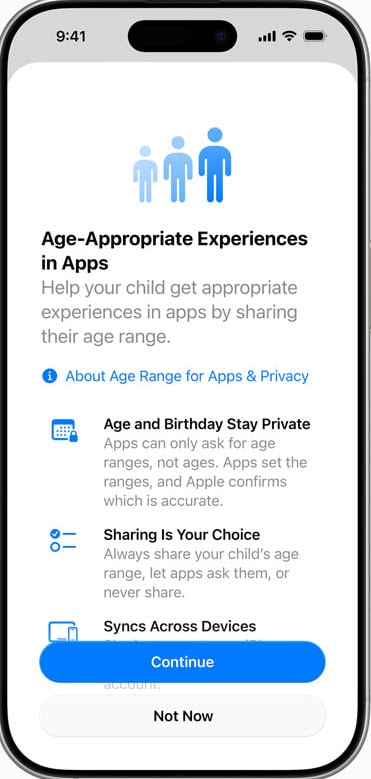 Apple is also adding the option to share only a child’s age range with apps rather than a full birthdate. This helps protect privacy while still allowing apps to deliver age-appropriate experiences.
Another significant step: protections for teens. Web filters, communication safety, and other safeguards that were previously aimed mostly at younger kids will now turn on automatically for ages 13 to 17. The App Store is also adopting more precise ratings — 13+, 16+ and 18+ — to help parents make better decisions about what apps are suitable.
Finally, communication limits are getting stronger. Children will need parental approval before adding new contacts in Messages, FaceTime or phone calls. And third-party apps will soon be able to adopt the same system. Communication Safety is also expanding to blur sensitive images in shared photo albums and detect nudity in FaceTime calls.
*New iOS features for everyone
I’ve been testing a beta version of iOS 26, and so far, I find it relatively similar to its predecessor, although there are a few very useful new features and a shiny new addition to the way its screens look.
The most noticeable change is what Apple calls Liquid Glass, which makes icons, search bars and other elements translucent. It’s mostly a minor aesthetic improvement, but it does make it easier to see what’s underneath buttons and other screen elements. It’s an improvement, but unlike some enthusiasts who marvel at almost anything Apple announces, I don’t think it’s much to get excited about.
What is exciting, at least for some, is the ability to do live translation on phone calls. I tried it with a Spanish-speaking friend, and it worked well. There are delays just like with a human translator, but we were able to understand each other. Live Translation also works with iPhone Messages and Facetime, and it’s coming to Apple’s AirPods for in-person translation.
Another useful update is the phone app’s “Screen Unknown Callers,” which asks people calling from unsaved numbers for more information before ringing your iPhone. Unlike some people, I usually answer calls from unknown callers because I don’t want to miss calls from journalists, doctors and others outside of my contact list, so I’m excited about this new feature.
Apple is also making it easier to use ChatGPT to analyze what’s on your iPhone screen. For example, it’s pretty hard to interpret the sleep chart the Apple Health app displays if you wear an Apple Watch to bed, but I was able to take a screen shot of that display, press the Ask button that came up and get an easy-to-understand explanation from ChatGPT.
In addition to adding translation, the Messages app now allows you to create polls in group chats, which is perfect for coordinating with friends or colleagues. But this only works if everyone in the group is using a device with iOS 26, so people with earlier versions or Android will not see the same thing as iOS 26 users.
Apple has also enhanced what it calls “Visual Intelligence.” On iPhones with the Camera Control button, you can press and hold it to pull up details about a restaurant or business, translate or summarize text, have it read aloud, identify plants and animals, and more.
You can even create a calendar entry based on data in screenshots. I tried this and found it to accurately recognize the time and date in the image but not enter the name of the event.
You can also add that function to the Action Button, which is on the top right side of some of the more recent models. When you invoke this feature in the camera, you can either click “Ask” to get information about the image from ChatGPT or do a Google image search. When it comes to AI, so-called Apple Intelligence isn’t nearly as intelligent as tools from Google, OpenAI and other companies, but I do give Apple a lot of credit for using other companies’ tools until its own AI services are competitive.
The new operating system is available starting on Monday September 15th as a free update. You might get a prompt to install it automatically, but if you don’t, you can manually check by going to Settings – General – Software Update. Keep in mind that although iOS 26 runs on iPhone 11 and newer, some of the advanced features, including Visual Intelligence, require the latest hardware such as the iPhone 15 Pro or later.
*This portion of the post is adapted from my column that first appeared in the Mercury News